







Best Scenic & Virtual Treadmill Route Apps (2026)
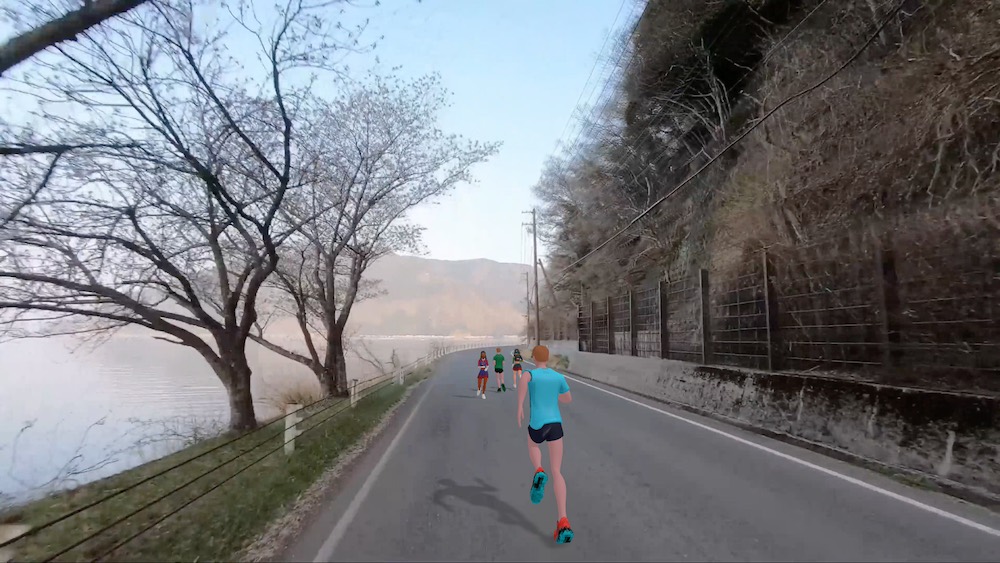
Best Scenic & Virtual Treadmill Route Apps (2026)
Staring at a blank console is why a lot of indoor runs die at minute eight. Scenic and virtual treadmill route apps fix that boredom problem: filmed outdoor paths, 3D worlds, or phone-first route framing so your brain has somewhere to go while your feet stay on the belt.
This guide compares the main options people actually search for in 2026—Kinomap, iFIT, BitGym, SummitRoom, Zwift, and Treadmill Buddy—so you can match the immersion style to your treadmill and budget. It is not medical advice.
Quick picks
| If you want… | Start here |
|---|---|
| Real filmed roads and trails | Kinomap |
| Filmed destinations + auto incline on NordicTrack / ProForm | iFIT |
| Cinematic destinations on almost any deck (pace-matched video) | BitGym |
| Live map routes with auto-incline on supported models | SummitRoom |
| Social avatars and events more than “pretty scenery” | Zwift |
| Phone-first scenic / AR-style routes + Bluetooth / FTMS control | Treadmill Buddy |
There is no universal “best scenic app.” There is a best fit for how immersion works (video vs map vs game world) and whether your treadmill can be controlled.
What “scenic” actually means on a treadmill
People use the same search terms for three different products:
- Filmed outdoor video – You watch a real route while you run (Kinomap, much of iFIT, BitGym-style libraries).
- Map / 3D route simulation – A map or rendered path advances with your pace; incline may follow the elevation profile (SummitRoom and similar).
- Scenic / AR companion framing – Routes and visuals keep you oriented without requiring a filmed travel library or a full multiplayer game (Treadmill Buddy’s scenic / AR-oriented experience).
If you bought the wrong category, you will hate the app even when reviews are glowing. Decide the immersion type first.
Kinomap: real-world video library
Kinomap is the default answer when someone says scenic treadmill workout and means real outdoor footage. Routes are geolocated videos; on compatible equipment (including many FTMS decks), incline can follow the terrain.
Strengths
- Large, travel-feel video catalog
- Free tier exists; full library sits behind a subscription (check current pricing)
- Strong fit if boredom is the main enemy and you want “I’m somewhere else”
Trade-offs
- Experience quality depends on route filming and your connection method
- Auto-control is only as good as your treadmill’s protocol support
- Less of a persistent social world than Zwift
Honest take: if filmed roads are the product you want, Kinomap belongs on the shortlist—even when you also evaluate Treadmill Buddy for phone control.
iFIT: scenic + auto-incline in a brand ecosystem
iFIT pairs trainer-led and filmed outdoor content with automatic speed and incline on compatible NordicTrack, ProForm, and related machines. That terrain matching is why owners search for it under virtual treadmill routes.
Strengths
- Immersion jumps when the deck actually climbs with the video
- Structured programmes layered on scenic destinations
Trade-offs
- Best experience is tightly tied to iFIT-ready hardware
- Membership is required for the full content experience; verify current tiers
- On a non-iFIT treadmill you may be watching and adjusting manually—still useful, less magical
Pick iFIT when you already own (or are buying) that ecosystem. Do not assume every “scenic” marketing screenshot will drive your console.
BitGym: destinations for almost any treadmill
BitGym leans into cinematic destination video with pace matching (including camera or Bluetooth approaches depending on setup). It is often chosen when people want travel visuals without buying into one treadmill brand’s membership stack.
Strengths
- Works as a visual companion across many decks
- Destination variety aimed at “I need something beautiful to look at”
Trade-offs
- Confirm how pace matching works on your phone/TV setup before you subscribe
- Machine control features differ from FTMS-first apps—verify expectations
SummitRoom: live map routes + auto-incline claims
SummitRoom markets live 3D map running with elevation-aware auto-incline on a listed set of models, plus broader “any treadmill” tracking. It sits closer to map simulation than filmed Kinomap-style travel.
Strengths
- Elevation-linked incline is the hook for map runners
- Web / phone options reduce “buy another screen” friction for some users
Trade-offs
- Auto-incline only matters on supported models—check the current list
- Map immersion is not the same as filmed outdoor video; pick deliberately
Zwift: virtual world first, scenery second
Zwift’s power is social racing, events, and progression. The world is virtual and game-like. Runners use it for motivation more than for “I want a quiet coastal trail video.”
Include it in a scenic shortlist only if other avatars on a course is what keeps you finishing. For pure filmed scenery, Kinomap or iFIT usually match the search intent better. For phone-first treadmill control without a bike-trainer stack, compare Treadmill Buddy vs Kinomap vs Zwift.
Treadmill Buddy: scenic routes with phone-first control
Treadmill Buddy is built for indoor treadmill training on iOS and Android: connect over Bluetooth (including FTMS where the deck supports it), run or walk with guidance, and use scenic / virtual-style routes so the session is not a blank wall stare.
Where it fits this list
- You want phone → connect → route without a smart-bike ecosystem
- You care about speed/incline control on supported FTMS treadmills and something visual to follow
- You also need a Manual path when Bluetooth is flaky or missing—so “scenic” is not locked to one hardware brand
Where it is not trying to win
- It is not a Kinomap-sized filmed travel archive
- It is not Zwift’s multiplayer game layer
- Compatibility always depends on your exact treadmill—screenshots are not a guarantee
If your search is best scenic treadmill app but your real job is “make me finish Tuesday’s incline walk on the deck I already own,” Treadmill Buddy is aimed at that job.
How to choose in one honest week
- Name the immersion you want: filmed video, map/3D, game world, or phone scenic + control.
- Check whether your treadmill speaks Bluetooth fitness protocols (FTMS or brand equivalent) if you want auto grade/speed.
- Run the same three weekdays on one app only. Keep the one that raised sessions finished, not the one with the prettiest trailer.
- Re-check subscription price against how many indoor sessions you actually completed.
Try a scenic indoor session with Treadmill Buddy
If you want scenic framing plus phone-first Bluetooth / FTMS control on a compatible treadmill—without locking into a bike-trainer stack—start at https://www.treadmillbuddy.com.
Open the app, connect or use Manual mode, pick a route, and judge it the only useful way: whether the next indoor session is easier to start.
Not medical advice. Match incline, speed, and volume to your fitness level and any guidance from a qualified professional. Features and pricing change; verify current store listings and treadmill compatibility before you subscribe.